
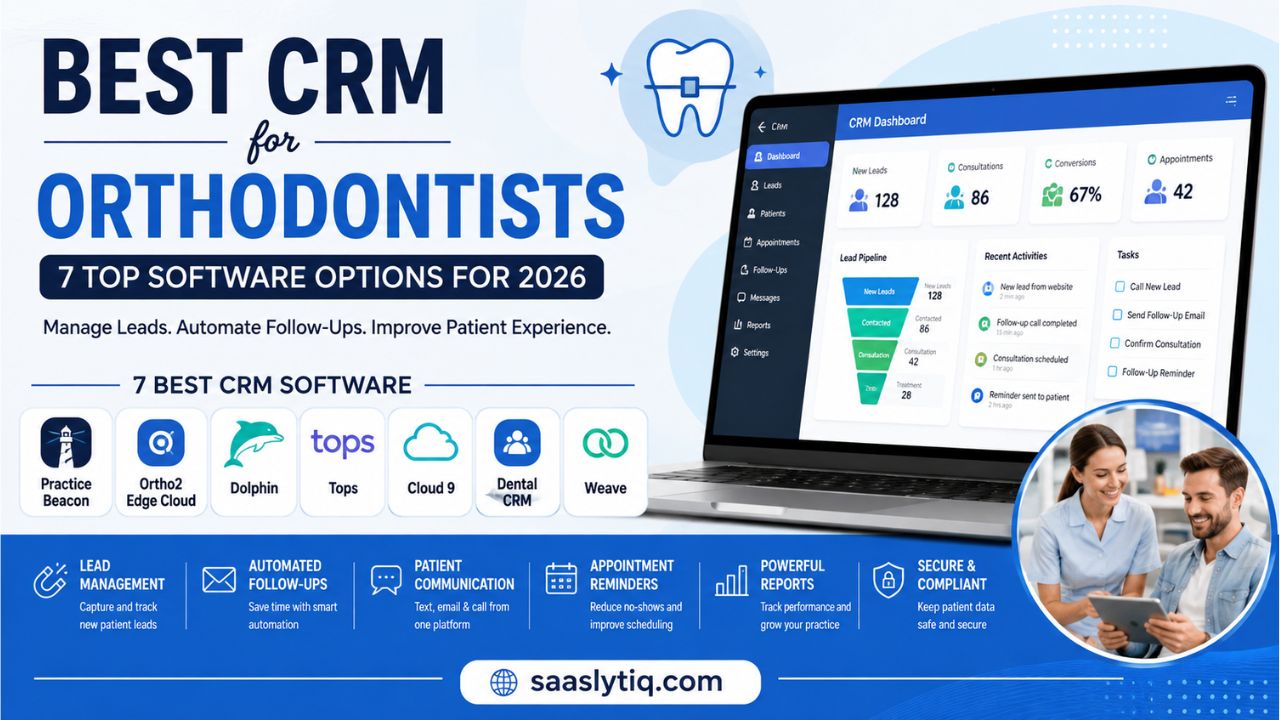
Choosing the best CRM for orthodontists can make a big difference in how smoothly a practice handles new patients, follow-ups, appointments, and daily communication. Orthodontic practices often receive leads from phone calls, website forms, social media, referrals, and online ads. Without a proper system, it can be difficult to track every inquiry and follow up at the right time. A good CRM helps organize this information and keeps potential and existing patients moving through the right stages.
The best CRM for orthodontists should do more than store patient contact details. It should help your team manage leads, automate follow-ups, send appointment reminders, improve communication, and track the patient journey from the first inquiry to treatment. Some platforms also integrate with orthodontic practice management software, scheduling tools, and communication systems. This can reduce repetitive work and give your staff more time to focus on patients.
In this guide, we compare the best CRM options for orthodontists based on features, ease of use, communication tools, automation, integrations, and overall value. Whether you run a small orthodontic office or manage a growing multi-location practice, this guide will help you find a CRM that fits your workflow and business needs.
What Is a CRM for Orthodontists?
A CRM for orthodontists is software that helps an orthodontic practice manage leads, patient communication, follow-ups, and relationships in one place. Instead of keeping information across spreadsheets, emails, phone notes, and different tools, a CRM gives your team a central system for tracking each patient interaction. It can show where a new lead came from, whether the team contacted them, and what step they need to take next.
For an orthodontic practice, lead management is especially important. A potential patient may contact your office after seeing an online advertisement, visiting your website, or receiving a referral. If the team does not follow up quickly, that person may choose another orthodontist. An orthodontic CRM can help staff track new patient leads, schedule consultations, send follow-up messages, and monitor the patient journey from the first inquiry to the start of treatment.
A good CRM can also support patient communication and workflow automation. Features such as two-way texting, email communication, appointment reminders, automated follow-ups, referral tracking, and reporting can reduce manual work. Some platforms can also connect with orthodontic practice management software, scheduling systems, and other tools already used by the practice.
It is important to understand that a CRM and an orthodontic practice management system are not always the same thing. Practice management software usually focuses on areas such as patient records, treatment planning, scheduling, billing, and clinical workflows. A CRM focuses more on leads, communication, marketing, follow-ups, and patient relationships. For many orthodontic practices, using these systems together can create a more complete workflow.
If you are comparing different CRM platforms, our HubSpot CRM review provides a closer look at its features, pricing, pros, and cons.
7 Best CRM Software for Orthodontists
Choosing the right CRM depends on what your orthodontic practice needs most. Some platforms focus on lead management and patient communication, while others combine CRM features with complete orthodontic practice management. The best option should fit your workflow, connect with the tools you already use, and help your team manage leads and patients without adding unnecessary complexity.
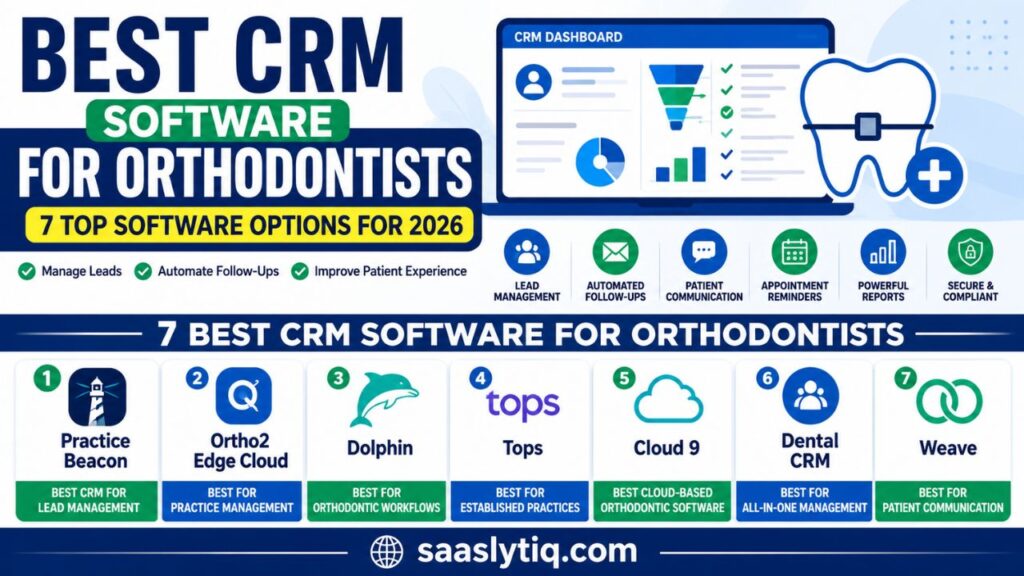
Here are some of the best CRM and orthodontic software options to consider:
1. PracticeBeacon – Best CRM for Orthodontic Lead Management
PracticeBeacon is designed specifically for orthodontic practices that want better control over their leads and patient journey. It helps teams track new inquiries, manage follow-ups, and see where each prospective patient is in the conversion process. This makes it useful for practices that receive leads from multiple marketing channels.
Its CRM features can help orthodontic teams organize lead information and avoid missed follow-ups. The platform also focuses on connecting marketing activity with patient acquisition, which can help practices understand which sources generate the most valuable leads.
Best for: Orthodontic practices focused on lead tracking, follow-ups, and patient acquisition.
2. Ortho2 Edge Cloud – Best for Practice Management
Ortho2 Edge Cloud is an orthodontic practice management platform that combines several important practice workflows in one system. It can help practices manage scheduling, patient information, communication, and day-to-day operations through a cloud-based environment.
It is a good option for orthodontists who want more than a traditional CRM. Instead of focusing only on lead management, it provides tools designed around the broader needs of an orthodontic practice.
Best for: Practices looking for orthodontic-focused practice management with cloud access.
3. Dolphin – Best for Orthodontic Workflows
Dolphin is a well-known name in orthodontic software and offers tools for managing different parts of an orthodontic practice. Its solutions can support areas such as patient management, imaging, treatment planning, and practice workflows.
For practices that need strong clinical and orthodontic functionality alongside patient management, Dolphin can be worth considering. However, practices mainly looking for marketing automation and lead nurturing may want to compare its CRM capabilities with dedicated CRM platforms.
Best for: Orthodontists who need clinical, imaging, and practice-management tools.
4. Tops – Best for Established Orthodontic Practices
Tops is another orthodontic practice management solution that focuses on the operational side of running a practice. It can help with scheduling, billing, patient communication, reminders, and other daily workflows.
Its broader practice-management approach makes it more suitable for orthodontists who want to manage several areas of their practice from one platform. Before choosing it as a CRM, however, consider whether its lead management and marketing features match your practice’s needs.
Best for: Established orthodontic practices that need comprehensive practice management.
5. Cloud 9 – Best Cloud-Based Orthodontic Software
Cloud 9 provides cloud-based tools designed for orthodontic practices. Cloud access allows authorized team members to work with practice information without being tied to a single computer or location.
The platform can support scheduling, patient management, communication, and other orthodontic workflows. This can be particularly useful for growing practices or teams that need easier access to their software.
Best for: Orthodontic practices that prefer cloud-based practice management.
6. DentalCRM – Best for All-in-One Patient Management
DentalCRM focuses on bringing patient management, scheduling, communication, and other practice functions together. An all-in-one approach can reduce the need to switch between multiple systems during the day.
For orthodontic practices, the main advantage is having patient information and communication tools organized in one place. However, you should check whether the platform supports the specific orthodontic workflows and integrations your practice requires.
Best for: Practices looking for an all-in-one dental CRM solution.
7. Weave – Best for Patient Communication
Weave is mainly known for patient communication and engagement tools. It can help practices manage phone calls, text messages, appointment reminders, and other communication tasks.
For orthodontists, strong communication can make a noticeable difference in the patient experience. Weave can be useful when the main goal is to make communication easier rather than replace a complete orthodontic practice management system.
Best for: Orthodontic practices that want stronger patient communication and engagement.
If you want to explore CRM automation in more detail, our Zoho CRM review covers its automation tools, features, pricing, and overall value.
Best CRM for Orthodontists: Quick Comparison
| CRM/Software | Best For | Main Strength |
| PracticeBeacon | Lead management | Lead tracking and follow-ups |
| Ortho2 Edge Cloud | Practice management | Orthodontic workflows |
| Dolphin | Clinical workflows | Imaging and treatment tools |
| Tops | Established practices | Practice operations |
| Cloud 9 | Cloud management | Cloud-based access |
| DentalCRM | All-in-one management | Patient management |
| Weave | Communication | Calls and messaging |
Note: These platforms serve slightly different purposes. A dedicated CRM may be better for lead generation and follow-ups, while an orthodontic practice management platform may be better for scheduling, clinical workflows, and billing. Always compare the features and integrations with your existing systems before making a decision.
Our Take: What Matters Most for Orthodontists
When comparing CRM software for orthodontists, we found that the number of features is not the only thing that matters. The more important question is whether the software can make everyday work easier for the orthodontic team. A useful CRM should help staff capture new leads, organize patient information, follow up on inquiries, and keep track of consultation bookings.
For example, imagine a potential patient submitting a consultation request through your website. The team should be able to see the new lead, assign it to a staff member, record communication, and track whether the patient scheduled an appointment. A simple workflow like this can be more valuable than a platform filled with features that your team rarely uses.
We also recommend checking how well the CRM integrates with your existing orthodontic practice management software. If your practice already uses separate tools for scheduling, patient records, billing, or communication, the CRM should work alongside them instead of creating another disconnected system.
For practices focused on getting more new patients, lead tracking and automated follow-ups should be high priorities. Practices looking for broader management may need stronger scheduling, patient management, and workflow features. In our view, the best CRM is the one that fits your current workflow and helps your team manage leads and patients more efficiently.
Key Features to Look for in a CRM for Orthodontists
The best CRM for orthodontists should solve real problems instead of simply adding more software to your practice. Before choosing a platform, look at how well it handles leads, patient communication, follow-ups, scheduling, and workflow automation. A CRM should also work smoothly with the practice management tools your team already uses.
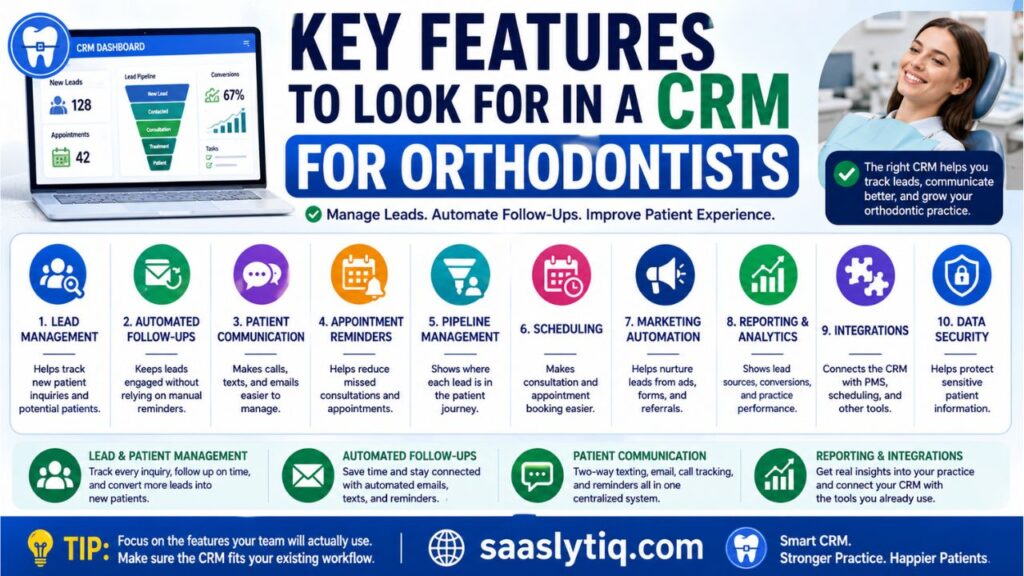
Here are the most important features to consider:
| Key Feature | Why It Matters for Orthodontists |
| Lead Management | Helps track new patient inquiries and potential patients |
| Automated Follow-Ups | Keeps leads engaged without relying on manual reminders |
| Patient Communication | Makes calls, texts, and emails easier to manage |
| Appointment Reminders | Helps reduce missed consultations and appointments |
| Pipeline Management | Shows where each lead is in the patient journey |
| Scheduling | Makes consultation and appointment booking easier |
| Marketing Automation | Helps nurture leads from ads, forms, and referrals |
| Reporting & Analytics | Shows lead sources, conversions, and practice performance |
| Integrations | Connects the CRM with PMS, scheduling, and other tools |
| Data Security | Helps protect sensitive patient information |
Lead and Patient Management
Lead management is one of the most valuable CRM features for an orthodontic practice. Your team can track where each inquiry came from, when the patient was contacted, and what action is needed next. This reduces the chance of losing valuable leads because someone forgot to follow up.
Automated Follow-Ups
Not every potential patient schedules a consultation after the first contact. Automated follow-ups can help your team stay connected through emails, text messages, or other communication channels. This can save staff time while keeping prospective patients engaged.
Patient Communication
Good communication can improve the patient experience. Look for features such as two-way texting, email communication, appointment reminders, and call tracking. Having these conversations organized in one system can make it easier for your team to respond quickly.
Reporting and Integrations
A CRM should also help you understand what is working. Reporting tools can show lead sources, conversion rates, appointment activity, and other useful information. Integrations are equally important because your CRM may need to connect with orthodontic practice management software, scheduling systems, forms, or communication tools.
For practices interested in advanced CRM reporting and integrations, our Salesforce CRM review provides a detailed look at its features and capabilities.
Tip: Do not choose a CRM based only on the number of features it offers. Focus on the features your team will actually use and make sure the software fits your existing orthodontic workflow.
CRM vs. Orthodontic Practice Management Software
CRM and orthodontic practice management software are related, but they are not exactly the same. A CRM mainly focuses on leads, patient communication, follow-ups, marketing, and relationship management. It helps your team turn inquiries into consultations and keep patients engaged throughout their journey.
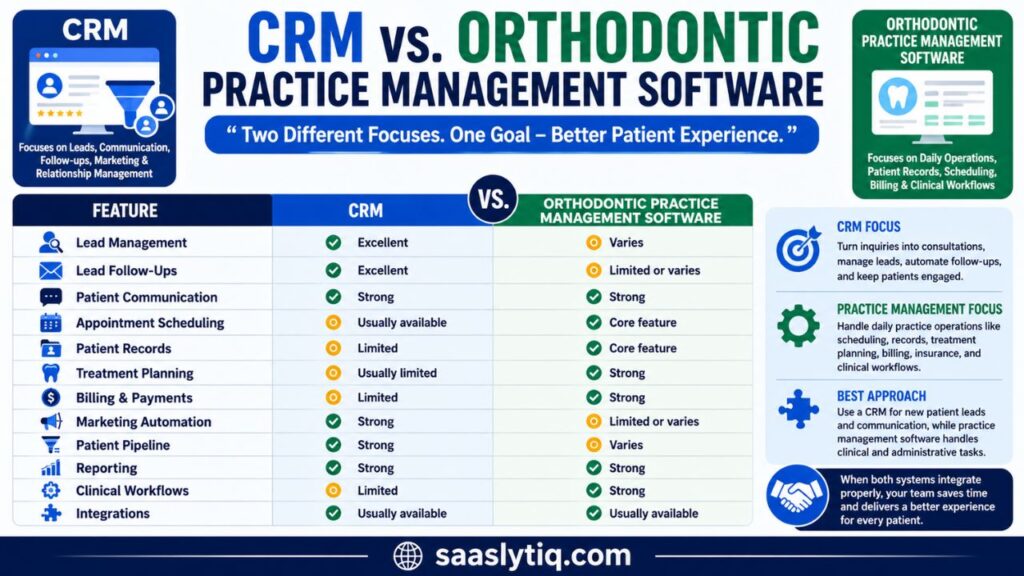
Orthodontic practice management software focuses more on the daily operations of the practice. It can handle areas such as patient records, appointment scheduling, treatment planning, billing, insurance, and clinical workflows. Some modern platforms combine CRM and practice management features, while others are designed for one specific purpose.
| Feature | CRM | Orthodontic Practice Management Software |
| Lead Management | Excellent | Varies |
| Lead Follow-Ups | Excellent | Limited or varies |
| Patient Communication | Strong | Strong |
| Appointment Scheduling | Usually available | Core feature |
| Patient Records | Limited | Core feature |
| Treatment Planning | Usually limited | Strong |
| Billing & Payments | Limited | Strong |
| Marketing Automation | Strong | Limited or varies |
| Patient Pipeline | Strong | Varies |
| Reporting | Strong | Strong |
| Clinical Workflows | Limited | Strong |
| Integrations | Usually available | Usually available |
For many orthodontic practices, the best approach is not to choose one system over the other. A CRM can manage new patient leads and communication, while practice management software handles clinical and administrative tasks. When both systems integrate properly, your team can spend less time moving information between platforms and more time focusing on patients.
How Much Does CRM Software for Orthodontists Cost?
The cost of CRM software for orthodontists can vary widely depending on the platform, number of users, features, and practice size. Some providers offer fixed monthly plans, while others use custom pricing based on the needs of the practice. You may also find software that charges per user, per location, or according to the number of patients and leads you manage.
When comparing pricing, do not focus only on the monthly subscription. Check what is included in each plan and whether you will need to pay extra for setup, data migration, integrations, additional users, or advanced automation.
| Pricing Factor | What to Check |
| Monthly Subscription | Basic cost of the CRM |
| Number of Users | Whether staff accounts cost extra |
| Locations | Extra fees for multiple offices |
| Integrations | Costs for connecting other software |
| Setup | One-time implementation or onboarding fees |
| Automation | Whether advanced workflows are included |
| Support | Level of customer and technical support |
| Data Migration | Cost of moving existing patient or lead data |
For a small orthodontic practice, a simple CRM with essential lead management and communication features may be enough. Larger or multi-location practices may benefit from a more advanced platform with automation, reporting, integrations, and team management. Before buying, request a demo or quote and calculate the total cost of ownership, not just the advertised starting price.
How to Choose the Best CRM for Your Orthodontic Practice
Choosing the best CRM for orthodontists depends on your practice size, workflow, budget, and goals. A small orthodontic office may only need lead tracking, follow-ups, and patient communication. A larger practice may need advanced automation, reporting, integrations, and multi-location support.
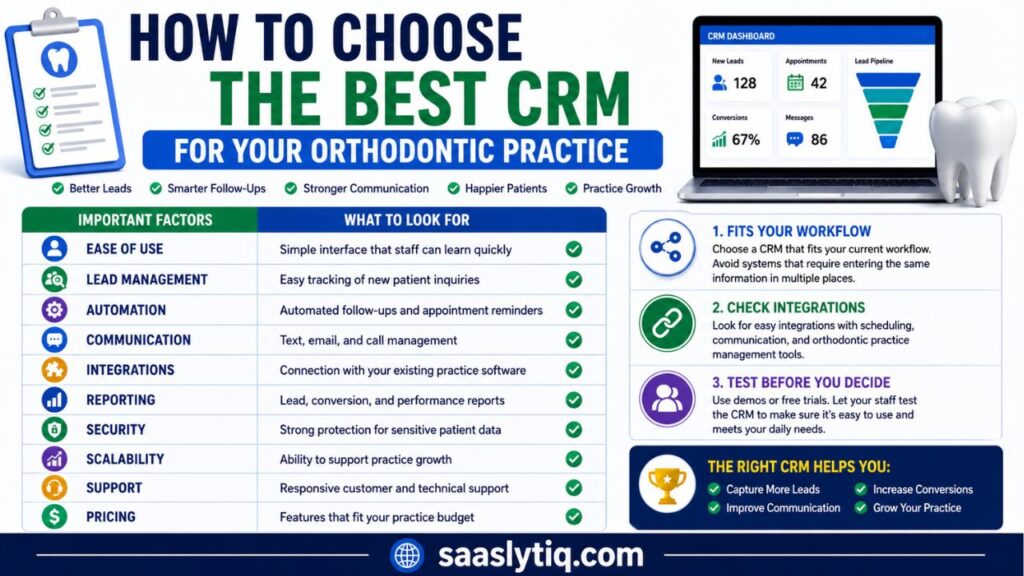
Before choosing a CRM, compare these important factors:
| Factor | What to Look For |
| Ease of Use | Simple interface that staff can learn quickly |
| Lead Management | Easy tracking of new patient inquiries |
| Automation | Automated follow-ups and appointment reminders |
| Communication | Text, email, and call management |
| Integrations | Connection with your existing practice software |
| Reporting | Lead, conversion, and performance reports |
| Security | Strong protection for sensitive patient data |
| Scalability | Ability to support practice growth |
| Support | Responsive customer and technical support |
| Pricing | Features that fit your practice budget |
You should also consider how easily the CRM fits into your current workflow. If your team needs to enter the same information in several systems, the software may create more work instead of reducing it. Look for integrations that connect your CRM with scheduling, communication, and orthodontic practice management tools.
Finally, take advantage of demos or free trials when available. Let the staff who will use the CRM test the system before making a decision. The right software should be easy to use, support your patient journey, and help your practice manage leads and communication more efficiently.
Conclusion
Finding the best CRM for orthodontists can help your practice manage leads, improve patient communication, and reduce missed follow-ups. The right platform can also make it easier for your team to track new patient inquiries and guide them through the consultation and treatment journey.
Before choosing a CRM, consider your practice size, budget, workflow, communication needs, and existing software. A good CRM should be easy for your team to use and should integrate well with the tools you already have. Whether you need better lead management, automated follow-ups, or complete practice management, choose software that solves your actual business needs rather than simply offering the most features.
FAQs About CRM for Orthodontists
What is the best CRM for orthodontists?
The best CRM depends on your practice needs. PracticeBeacon is a strong option for orthodontic lead management, while platforms such as Ortho2 Edge Cloud, Dolphin, and Tops may be better suited to practices looking for broader orthodontic practice management.
Do orthodontists need a CRM?
A CRM is not required for every orthodontic practice, but it can be valuable for practices that receive many new patient inquiries. It helps teams organize leads, manage follow-ups, improve communication, and track the patient journey.
What is the difference between a CRM and orthodontic practice management software?
A CRM mainly focuses on leads, communication, follow-ups, marketing, and patient relationships. Practice management software focuses more on scheduling, patient records, treatment planning, billing, and daily practice operations. Some platforms combine both types of functionality.
Can a CRM automate patient follow-ups?
Yes. Many CRM platforms offer automated follow-ups through email, text messaging, reminders, and other communication channels. Automation can help your team stay connected with potential patients without manually tracking every follow-up.
Is CRM software secure for orthodontic practices?
Security should be an important factor when choosing CRM software. Orthodontic practices handle sensitive patient information, so you should check the provider’s security measures, privacy policies, compliance features, and available integrations before using the platform.
How much does CRM software for orthodontists cost?
CRM pricing varies based on features, users, locations, and the provider. Some platforms offer monthly plans, while others provide custom quotes. Always check the complete pricing structure, including setup, integrations, additional users, and support costs.