

Finding the right keywords is an important part of SEO. However, choosing a keyword without checking the competition can make it harder to rank in Google. The allintitle: search operator helps you explore how many pages use specific words in their titles. It gives you a quick way to research a topic before you spend time creating content.
The search query allintitle:internal tells Google to look for pages that include the word “internal” in their titles. SEO professionals can use this query to explore existing content and understand how websites target related topics. However, it does not directly measure keyword difficulty or guarantee that a keyword will be easy to rank for.
In this guide, you will learn how the allintitle: operator works, how to use it for keyword research, and how it differs from other Google search operators. You will also discover its limitations and learn how to evaluate keyword opportunities more effectively. These practical steps will help you make better SEO decisions and plan content around relevant search terms.
What Does Allintitle: Internal Mean?
The allintitle: search operator is a Google search command that helps users find web pages with specific words in their titles. When you search for allintitle:internal, Google looks for pages that include the word “internal” in their title links. SEO professionals can use this search to explore existing content, research topics, and identify potential keyword opportunities.
What Does the allintitle: Operator Do?
The allintitle: operator narrows a Google search by focusing on words in page titles. For example, searching for allintitle:internal linking SEO asks Google to find pages whose titles contain all three terms: “internal,” “linking,” and “SEO.”
This can help with SEO keyword research and competitor analysis. You can compare different keyword variations and examine how other websites target a topic. However, Google may display results differently over time, and the search results do not provide an exact measure of keyword difficulty.
What Does allintitle:internal Search For?
The query allintitle:internal searches for pages with the word “internal” in their titles. The results may cover topics such as internal linking, internal website search, internal tools, or internal business processes.
If your goal is to research internal linking strategies, try a more specific query, such as allintitle:internal linking. Then review the pages to understand their content, search intent, and title structure.
Important: The allintitle: operator does not find internal links directly. It helps you discover pages based on their titles. To find internal linking opportunities on your own website, review your existing content and identify relevant pages that could link to one another.
How to Use Allintitle: Internal in Google
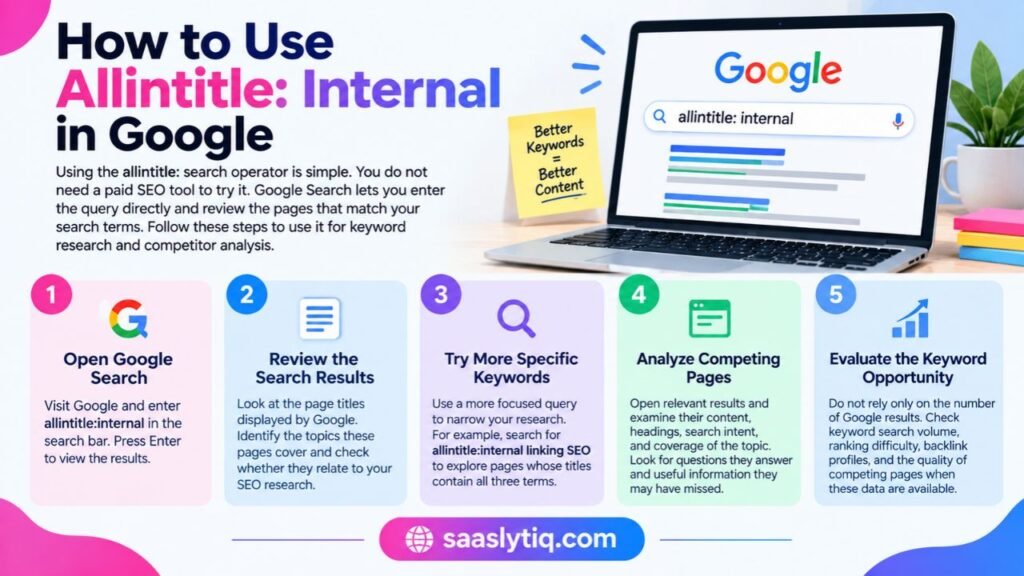
Using the allintitle: search operator is simple. You do not need a paid SEO tool to try it. Google Search lets you enter the query directly and review the pages that match your search terms. Follow these steps to use it for keyword research and competitor analysis.
Step 1: Open Google Search
Visit Google and enter allintitle:internal in the search bar. Press Enter to view the results.
Step 2: Review the Search Results
Look at the page titles displayed by Google. Identify the topics these pages cover and check whether they relate to your SEO research. Remember that the results may include different types of content.
Step 3: Try More Specific Keywords
Use a more focused query to narrow your research. For example, search for allintitle:internal linking SEO to explore pages whose titles contain all three terms. You can also compare related keyword variations to understand how websites target different topics.
Step 4: Analyze Competing Pages
Open relevant results and examine their content, headings, search intent, and coverage of the topic. Look for questions they answer and useful information they may have missed. This process can help you plan more complete and relevant content.
Step 5: Evaluate the Keyword Opportunity
Do not rely only on the number of Google results. Check keyword search volume, ranking difficulty, backlink profiles, and the quality of competing pages when these data are available. Tools such as Semrush can provide additional keyword research data, but you can begin your research with Google Search for free.
By following these steps, you can use the allintitle: operator as a starting point for SEO research. Combine it with content analysis and search intent to make better decisions about which topics to target.
How SEO Professionals Use Allintitle for Keyword Research
The allintitle: search operator can help SEO professionals explore keyword opportunities before creating new content. It provides a quick way to examine pages targeting specific terms in their titles. However, you should combine this search method with other SEO metrics to make informed decisions.
Estimate Keyword Competition
Search for a target keyword using allintitle: and review the pages Google returns. For example, allintitle:CRM software for small businesses can help you explore pages targeting that topic in their titles. A smaller number of results does not automatically mean the keyword is easy to rank for. You must also examine the quality and authority of competing websites.
Discover Long-Tail Keyword Opportunities
Long-tail keywords are specific search phrases that often reflect a clear user need. Try different keyword variations to discover topics that may suit your website. For example, a CRM review website could research phrases such as allintitle:CRM for small dental practices. Check the actual search demand before deciding whether to create a page.
Compare Keyword Variations
Use allintitle: to compare related search terms and understand how websites target different topics. For example, you could compare CRM software for dentists with CRM software for orthodontists. Review the search results to determine whether each phrase deserves a separate article or whether one comprehensive page can address both needs.
Identify Competing Content
The search operator can help you discover articles that target your chosen keyword. Open relevant pages and review their headings, content depth, examples, and search intent. Look for unanswered questions or missing information that your article could address more effectively.
Remember: allintitle: supports keyword research, but it does not replace a complete SEO analysis. Check search volume, backlink profiles, content quality, and ranking difficulty before selecting a keyword.
Allintitle vs. Intitle: What’s the Difference?
Both allintitle: and intitle: are Google search operators that help you find pages based on their titles. However, they differ in how they handle search terms. Understanding this difference can help you perform more focused keyword research and competitor analysis.
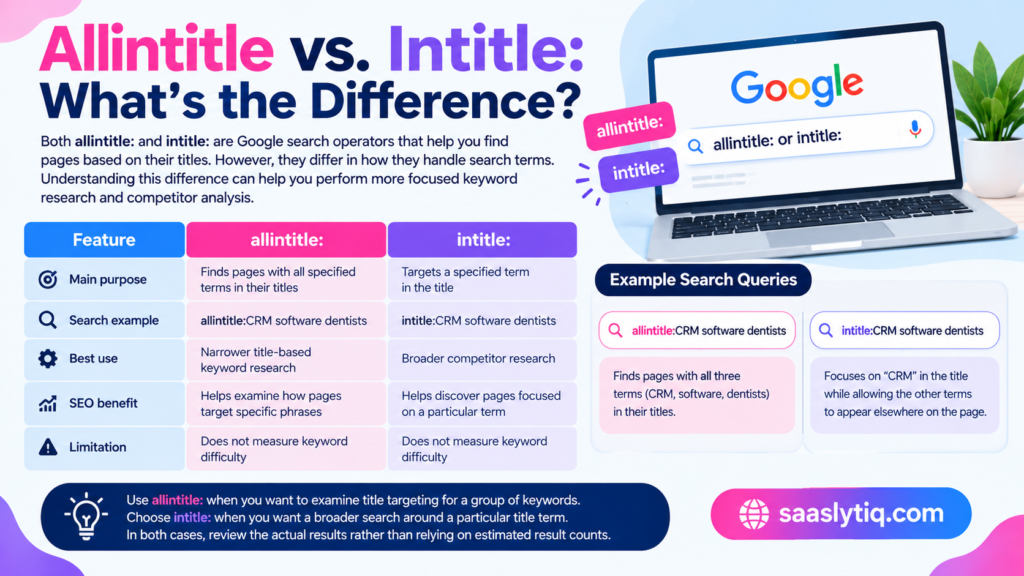
The allintitle: operator focuses on pages whose titles contain all the specified search terms. The intitle: operator focuses on a particular term in the title while allowing other search terms to appear elsewhere on the page.
Here is a quick comparison:
| Feature | allintitle: | intitle: |
|---|---|---|
| Main purpose | Finds pages with all specified terms in their titles | Targets a specified term in the title |
| Search example | allintitle:CRM software dentists | intitle:CRM software dentists |
| Best use | Narrower title-based keyword research | Broader competitor research |
| SEO benefit | Helps examine how pages target specific phrases | Helps discover pages focused on a particular term |
| Limitation | Does not measure keyword difficulty | Does not measure keyword difficulty |
For example, you could use allintitle:CRM software dentists to research pages with all three terms in their titles. With intitle:CRM software dentists, Google focuses on “CRM” in the title while considering the other terms in the search.
Use allintitle: when you want to examine title targeting for a group of keywords. Choose intitle: when you want a broader search around a particular title term. In both cases, review the actual results rather than relying on estimated result counts alone.
Is Allintitle a Reliable Way to Measure Keyword Difficulty?
The allintitle: search operator can help you explore keyword competition, but it cannot measure keyword difficulty on its own. It shows pages that match specific terms in their titles. It does not tell you how strong those pages are, how many quality backlinks they have, or how much organic traffic they receive.
For example, a search for allintitle:CRM software for dentists may return relatively few results. However, the pages that appear could belong to established websites with strong backlink profiles and useful content. A keyword with fewer title matches can still be difficult to rank for.
To evaluate a keyword more accurately, consider these factors:
- Search volume: Check how often people search for the keyword using a keyword research tool.
- Search intent: Determine what users expect to find when they enter the query.
- Content quality: Review whether competing pages provide accurate, useful, and complete information.
- Backlink profiles: Examine the quality and relevance of links pointing to competing pages.
- Website authority: Consider the strength and topical relevance of competing websites.
- Keyword difficulty: Use SEO tools such as Semrush to obtain an additional estimate of ranking competition.
You can start with Google Search for free and use allintitle: to discover potential opportunities. Then review the actual search engine results pages (SERPs) before choosing a target keyword.
The best approach is to treat allintitle: as an initial research method, not a final ranking decision. Combine it with search intent, competitor analysis, and content planning to make better SEO choices.
Common Mistakes to Avoid When Using Allintitle
The allintitle: operator can support SEO keyword research, but incorrect use can lead to poor decisions. Avoid these common mistakes to get more value from your Google searches.
1. Treating search results as exact counts
Google’s displayed result estimates can change and may not represent every matching page. Use them as rough indicators, not exact measurements of keyword competition.
2. Assuming fewer results mean easier rankings
A keyword with few title matches can still have strong competitors. Review their content quality, backlink profiles, website relevance, and search intent before targeting the keyword.
3. Confusing allintitle with internal link discovery
The query allintitle:internal finds pages based on their titles. It does not identify internal links between pages on a website. To improve internal linking, review your existing articles and connect related pages with relevant anchor text.
4. Ignoring search intent
A keyword may look promising but attract users who want something different from what your page offers. Review Google’s results to understand the type of content people expect before creating an article.
Avoid these mistakes by combining allintitle: searches with careful SERP analysis and relevant SEO data. This approach helps you select keywords based on real opportunities rather than a single search metric.
Frequently Asked Questions About Allintitle
What does allintitle: mean in SEO?
The allintitle: operator is a Google search command that helps you find pages containing all specified search terms in their titles. SEO professionals use it for keyword research, competitor analysis, and exploring how websites target particular topics.
Does allintitle:internal find internal links?
No. The query allintitle:internal searches for pages with the word “internal” in their titles. To discover internal linking opportunities, review your website’s existing content and identify related pages that could link to one another.
Is allintitle: a keyword difficulty tool?
No. It helps you explore title-based search results, but it does not calculate keyword difficulty. Use additional data, including search volume, backlink profiles, competitor content quality, and SEO tool estimates, to assess ranking opportunities.
Which Google search operators work well with allintitle:?
The intitle:, site:, and quotation mark search techniques can support different types of SEO research. Use intitle: to explore pages targeting a particular title term, site: to investigate content on a specific website, and quotation marks to search for an exact phrase. Check the actual results because search operators can behave differently depending on the query.
Conclusion
The allintitle: search operator is a useful starting point for SEO keyword research and competitor analysis. It helps you explore pages that target specific terms in their titles and discover topics worth investigating. However, it does not provide an exact keyword difficulty score or guarantee easier rankings. For better results, combine Google searches with search intent analysis, content quality reviews, and relevant SEO metrics. This approach will help you identify meaningful keyword opportunities and create content that answers readers’ questions.