
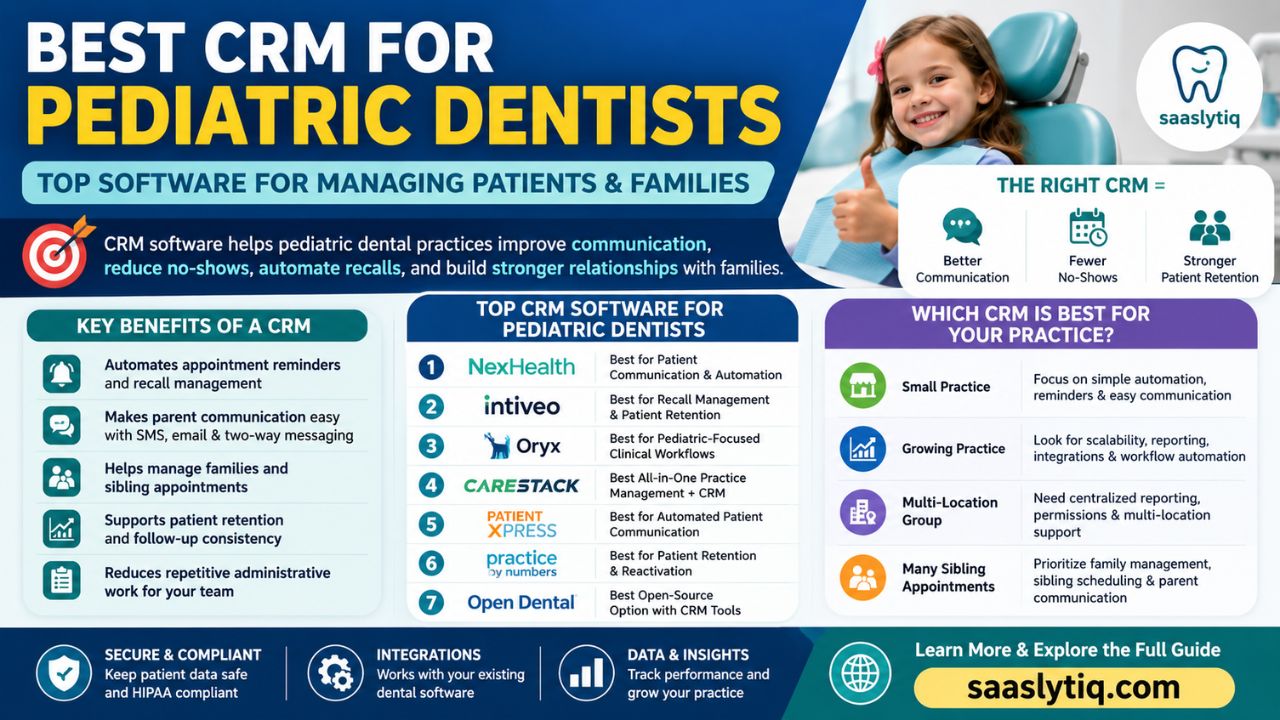
Pediatric dental practices have unique challenges that general dental practices may not face. Dental teams often communicate with parents or guardians, coordinate appointments for multiple children in the same family, and keep patients on regular preventive care schedules. A reliable CRM can make these tasks easier by bringing patient communication, appointment reminders, follow-ups, and recall campaigns into one place.
The best CRM for pediatric dentists should do more than store contact information. It should help practices build stronger relationships with children and their families. Features such as parent and guardian communication, automated SMS reminders, family scheduling, digital forms, treatment follow-ups, and recall automation can reduce administrative work and help prevent missed appointments. A CRM that integrates with your existing dental practice management software can make these workflows even more efficient.
Choosing dental software can be confusing, especially when most CRM platforms advertise similar features. A pediatric dental practice has different needs from a general dental office because the practice often communicates with parents, manages multiple children from the same family, and depends heavily on regular recall visits. In this guide, we look at these needs from a practical perspective rather than simply listing software features. We compare the platforms based on communication, family scheduling, recall management, automation, integrations, ease of use, and the type of pediatric practice each solution is best suited for.
The goal is not to recommend a CRM simply because it has a long list of features. What matters is how well the software fits your practice and solves the problems your team faces every day. This guide will help you compare the available options, understand their strengths and limitations, and choose a CRM that can improve communication, recalls, scheduling, and long-term relationships with families.
What Is a CRM for Pediatric Dentists?
A CRM for pediatric dentists is software that helps a dental practice manage relationships with children, parents, and guardians. It keeps important communication and patient engagement activities organized in one system. Instead of relying on separate spreadsheets, phone notes, emails, and manual reminders, staff can use a CRM to manage appointment communication, follow-ups, recalls, and patient interactions more efficiently.
Unlike a basic contact management system, a pediatric dental CRM focuses on the needs of children’s dental practices. Parents often handle appointments, treatment decisions, forms, and payments for their children. A good CRM can help staff communicate with parents, manage family information, schedule sibling appointments, send automated reminders, and follow up after visits. These features can improve the overall patient experience while reducing repetitive administrative work.
A CRM also works alongside dental practice management software (PMS). The PMS usually handles clinical records, billing, insurance, charting, and day-to-day practice operations. The CRM focuses more on communication, patient engagement, retention, and relationship management. When these systems integrate properly, a pediatric dental practice can create a smoother workflow from the first inquiry to the child’s next recall appointment.
For example, a CRM can send a parent an appointment confirmation, follow up after a child’s visit, and later send a recall reminder when the next dental checkup is due. This type of CRM automation helps staff spend less time on repetitive tasks and more time supporting patients and families.
For a pediatric practice, the most useful CRM is not necessarily the one with the longest feature list. A small office may only need reliable reminders, two-way messaging, and recall automation. A larger practice may need family scheduling, advanced segmentation, analytics, and multiple integrations. This difference is important when comparing CRM platforms because the “best” option depends on how the practice actually works.
How We Evaluated the Best Pediatric Dental CRMs
We focused on the features that can make a real difference in a pediatric dental workflow rather than treating every CRM feature as equally important. Our evaluation criteria include parent and guardian communication, family and sibling scheduling, appointment reminders, recall automation, treatment follow-up, digital forms, practice-management integrations, reporting, security, and ease of use.
We also considered the type of practice each platform may suit. A feature that is valuable for a multi-location pediatric dental group may be unnecessary for a small independent office. For this reason, our recommendations are based on different use cases instead of choosing one platform as the universal winner.
When comparing software, practices should also confirm current pricing, integrations, and compliance information directly with the vendor because these details can change over time.
Why Pediatric Dentists Need a Specialized CRM
Pediatric dentistry involves more than treating young patients. Dental teams also need to communicate with parents or guardians, coordinate family appointments, explain treatment plans, and keep children on regular preventive care schedules. A general CRM may handle basic customer communication, but a pediatric dental CRM should support the specific workflow of children’s dental practices.
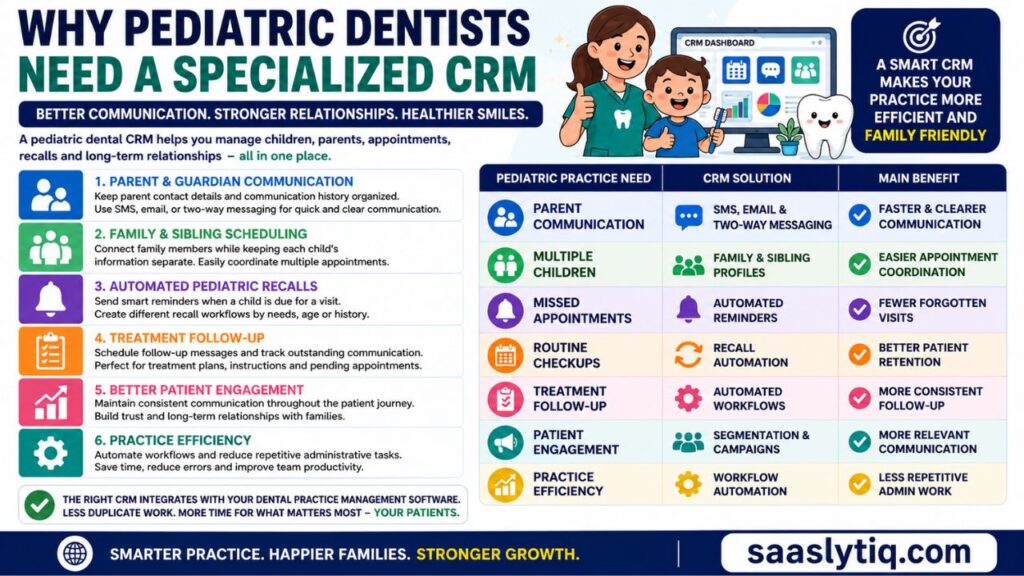
Parent and Guardian Communication
Parents usually make appointments and important treatment decisions for children. Clear and timely communication is therefore essential. A CRM can keep parent contact details, communication history, appointment information, and preferences organized in one place. Staff can use SMS, email, or two-way messaging to confirm appointments, answer routine questions, and send follow-up messages.
Family and Sibling Scheduling
Many pediatric dental practices treat several children from the same family. Managing separate appointments can become difficult when staff rely on manual records. A CRM with family scheduling and sibling management can connect family members while keeping each child’s information separate. This makes it easier to find suitable appointment times and coordinate multiple visits.
Automated Pediatric Recalls
Regular dental visits are an important part of children’s oral care. However, busy parents can easily forget future appointments. Recall automation can send reminders when a child is due for another visit. Practices can also create different recall workflows based on patient needs, age groups, or appointment history.
Treatment Follow-Up
Parents may need additional information after a child’s appointment or treatment. A CRM can help staff schedule follow-up messages and keep track of outstanding communication. This is useful for treatment plans, post-visit instructions, and appointments that still need to be scheduled.
Better Patient Engagement
Children may visit a practice for many years, so building a positive relationship with the family matters. A CRM helps practices maintain consistent communication throughout the patient journey. From the first appointment request to routine recalls, automated reminders, and follow-ups, the practice can provide a more organized experience for both parents and children.
| Pediatric Practice Need | CRM Solution | Main Benefit |
| Parent communication | SMS, email, and two-way messaging | Faster and clearer communication |
| Multiple children | Family and sibling profiles | Easier appointment coordination |
| Missed appointments | Automated reminders | Fewer forgotten visits |
| Routine checkups | Recall automation | Better patient retention |
| Treatment follow-up | Automated workflows | More consistent follow-up |
| Patient engagement | Segmentation and campaigns | More relevant communication |
| Practice efficiency | Workflow automation | Less repetitive administrative work |
The right CRM should also integrate with the practice’s existing dental practice management software. This reduces duplicate data entry and helps staff maintain a consistent patient experience. For pediatric practices, the goal is not simply to add another software tool. It is to create a smoother system for managing children, parents, appointments, recalls, and long-term family relationships.
Best CRM Software for Pediatric Dentists
Choosing the right CRM can make a noticeable difference in how a pediatric dental practice manages communication, appointments, recalls, and patient relationships. However, every practice has different needs. A small pediatric office may mainly need automated reminders and parent communication, while a growing practice may need stronger scheduling, analytics, integrations, and workflow automation.
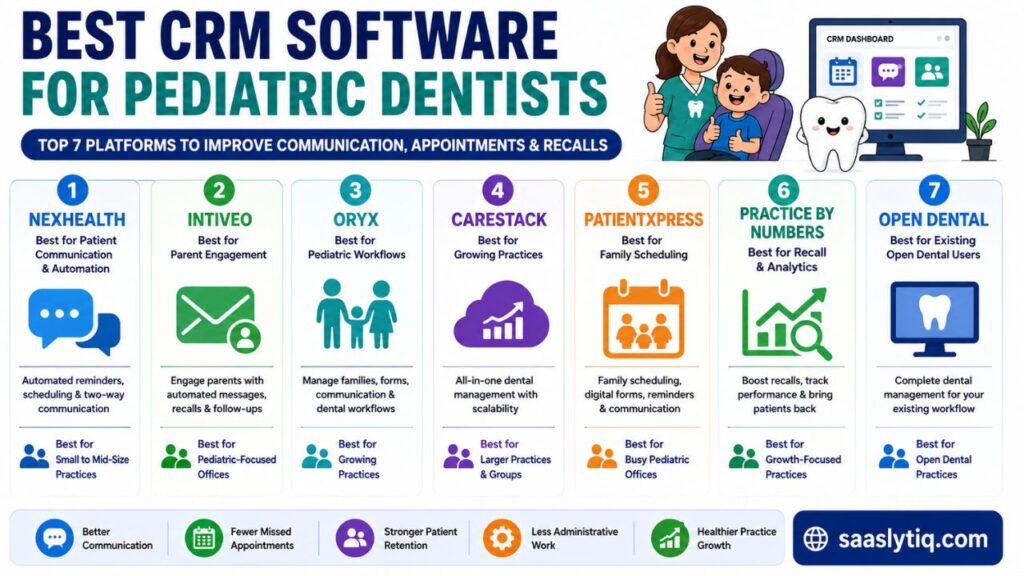
Below are some of the leading CRM and patient engagement platforms worth considering for pediatric dental practices. Each option has a different strength, so the best choice depends on your practice size, existing software, and the problems you want to solve.
1.NexHealth – Best for Patient Communication and Automation
NexHealth is a strong option for pediatric dental practices that want to improve patient communication and reduce manual administrative work. Its tools can help practices manage appointment scheduling, reminders, two-way communication, recalls, digital forms, and other patient engagement activities. This can be especially useful for offices where front-desk staff spend a significant amount of time confirming appointments and responding to routine messages.
What stands out: The biggest advantage for a pediatric practice is its focus on making patient communication more convenient. Automated reminders and digital communication can help staff stay connected with parents without requiring every interaction to be handled manually.
Potential limitation: Practices should check which features are included in their current plan and confirm how NexHealth integrates with their existing dental practice management software. Pricing, integrations, and available features can change over time.
Our take: NexHealth makes the most sense for a pediatric practice where patient communication, appointment scheduling, and automation are higher priorities than having a highly specialized pediatric clinical system. It is worth considering if your main goal is to make everyday communication with families more efficient.
2. Intiveo – Best for Pediatric Patient Engagement
Intiveo focuses on dental patient communication and engagement. Its tools can help pediatric practices manage appointment confirmations, reminders, two-way messaging, recalls, and follow-up communication.
One of its biggest advantages for pediatric dentistry is its focus on communicating with parents and guardians. Staff can use automated workflows to keep families informed throughout the appointment journey. This can be especially helpful for practices that handle a large number of appointments every day.
Intiveo can also work with existing dental practice management systems, allowing practices to add communication and engagement tools without completely changing their current workflow.
Best for: Pediatric dental offices that want stronger parent communication and automated patient engagement.
3. Oryx – Best for Pediatric-Specific Workflows
Oryx is designed with dental practices in mind and offers features that can support pediatric workflows. Its approach is useful for practices that want to manage family scheduling, patient communication, digital forms, and other daily activities from a connected platform.
Pediatric dentistry often requires special attention to family relationships and the child’s stage of dental development. A platform that supports pediatric workflows can make these tasks easier for both clinical and administrative teams.
Oryx may be particularly useful for practices that want more than a basic communication CRM and prefer a broader dental management solution.
Best for: Pediatric practices looking for software with dedicated dental and pediatric workflows.
4. CareStack – Best for Growing Pediatric Practices
CareStack is a cloud-based dental practice management platform that can support pediatric dentists and growing dental organizations. It combines several practice functions, including patient management, scheduling, communication, treatment planning, billing, and reporting.
For a growing pediatric practice, having these functions connected can make daily operations easier to manage. Larger practices and dental groups can also benefit from tools designed to support multiple locations and more complex workflows.
CareStack is worth considering when a practice needs broader practice management capabilities alongside patient engagement features.
Best for: Growing pediatric practices and dental groups that need a scalable platform.
5. PatientXpress – Best for Family Scheduling
PatientXpress focuses on patient communication and family-oriented workflows. This can be useful for pediatric dentists because one household may have several children who need appointments at different times.
Features such as family scheduling, digital forms, automated reminders, recalls, and communication tools can help reduce the administrative burden on front-desk teams. Automated communication can also help parents stay informed without requiring staff to make every reminder call manually.
For busy pediatric offices, these features can make the appointment process more convenient for both staff and families.
Best for: Pediatric practices that regularly manage sibling appointments and family scheduling.
6. Practice by Numbers – Best for Recall and Practice Analytics
Practice by Numbers is a useful option for dental practices that want to focus on patient retention, recalls, reactivation, and practice performance. Its tools can help practices identify patients who have not returned and create communication workflows to bring them back.
This can be valuable for pediatric dentists because regular preventive visits play an important role in maintaining long-term patient relationships. Instead of relying entirely on manual recall lists, practices can use automation to stay connected with families.
Its reporting and analytics tools can also help practice owners understand areas such as patient retention, appointment activity, and recall performance.
Best for: Pediatric dentists who want stronger recall management, reactivation, and analytics.
7. Open Dental – Best for Practices Already Using Open Dental
Open Dental is a popular dental practice management platform that can be a practical choice for pediatric practices already using its ecosystem. It provides tools for patient records, scheduling, billing, treatment planning, and other practice operations.
For practices that already rely on Open Dental, adding or connecting compatible patient communication and CRM tools may be more practical than moving to an entirely different system.
The main advantage is familiarity and integration with an existing workflow. However, practices should carefully compare its available patient engagement capabilities with dedicated dental CRM platforms before making a final decision.
Best for: Pediatric dental practices already using Open Dental or looking for a customizable dental software ecosystem.
Best CRM Options at a Glance
| CRM | Best For | Key Strength | Ideal Practice |
| NexHealth | Patient communication | Scheduling and automation | Small to mid-size practices |
| Intiveo | Parent engagement | Dental communication workflows | Pediatric-focused offices |
| Oryx | Pediatric workflows | Family and dental management | Growing practices |
| CareStack | Practice management | Scalable dental platform | Larger practices and groups |
| PatientXpress | Family scheduling | Sibling and family workflows | Busy pediatric offices |
| Practice by Numbers | Recall and analytics | Retention and reactivation | Growth-focused practices |
| Open Dental | Existing users | Dental practice management | Open Dental practices |
There is no single CRM that will be the perfect fit for every pediatric dentist. The right choice depends on whether your biggest challenge is parent communication, missed appointments, family scheduling, recall management, treatment follow-up, or practice growth. Before choosing a platform, compare its pediatric features, integrations, automation options, security, ease of use, and total cost.
Which CRM Is Best for Different Types of Pediatric Dental Practices?
Small Pediatric Dental Practice
A small practice may not need a complex platform with dozens of advanced features. If the main problems are missed appointments, manual reminders, and overdue recalls, a CRM with simple automation and reliable communication may provide enough value.
Growing Pediatric Dental Practice
A growing practice may need stronger patient segmentation, reporting, integrations, and workflow automation. As patient volume increases, manual communication becomes harder to manage, so scalability becomes more important.
Multi-Location Pediatric Dental Group
Multi-location practices have different requirements. They may need centralized reporting, consistent communication workflows, user permissions, and software that can support several offices without creating separate systems for every location.
Practice With Many Sibling Appointments
If your front desk regularly schedules two or more children from the same family, family management should be a major buying criterion. The ability to connect family members while keeping individual records separate can make scheduling much easier.
Key Features to Look for in a Pediatric Dental CRM
The best CRM for pediatric dentists should solve real problems for the practice. A long list of features does not always mean better software. What matters is whether the CRM makes it easier to communicate with families, manage appointments, improve recalls, and reduce repetitive work.
Family and Sibling Management
Family management is one of the most useful features for a pediatric dental practice. Parents may have two, three, or more children receiving care at the same office. The CRM should make it easy to view family relationships while keeping each child’s patient record separate.
A good system should also make sibling scheduling simple. Staff can quickly identify family members and coordinate appointments instead of searching through separate records.
Parent and Guardian Communication
Parents are usually the main point of contact for pediatric patients. For this reason, a CRM should provide reliable communication tools such as SMS, email, and two-way messaging.
The practice should be able to send appointment confirmations, reminders, follow-up messages, and recall notifications without creating every message manually. A communication history can also help staff understand previous conversations before contacting a family.
Automated Appointment Reminders
Missed appointments can affect both practice efficiency and patient care. Parents have busy schedules, so an appointment reminder can make a big difference.
Look for a CRM that supports automated reminders through channels such as text messages and email. Ideally, parents should also be able to confirm or request changes to an appointment without making a phone call.
Pediatric Recall Automation
Recall management is especially important in pediatric dentistry. Children need regular dental visits, but parents may forget to schedule the next appointment after a busy day.
A CRM with recall automation can identify patients who are due for another visit and send timely reminders. This helps the practice maintain relationships with families and reduces the number of patients who fall out of the recall cycle.
Digital Forms and Guardian Consent
Digital forms can make the new-patient process faster and easier. Parents can complete forms before arriving at the office instead of spending additional time at the front desk.
Depending on the practice and software, these forms may include medical history, contact information, insurance details, and guardian consent. A CRM should also protect this information with appropriate security controls.
Treatment Follow-Up
Communication should not stop when the child leaves the office. Some treatments require additional appointments, instructions, or follow-up communication with parents.
A CRM can help staff create follow-up workflows so important messages do not get forgotten. This can improve communication and help parents understand what needs to happen next.
Dental Practice Management Integration
A CRM should work well with the dental practice management software already used by the office. Integration can reduce duplicate data entry and help keep patient information consistent across systems.
Before choosing a CRM, check whether it integrates with platforms such as Dentrix, Open Dental, CareStack, or other systems used by your practice. The right integration can save staff time and create a smoother workflow.
Patient Segmentation and Automation
Not every family needs the same message. Patient segmentation allows a practice to organize patients based on factors such as age, appointment status, recall status, or treatment needs.
For example, a practice could create different communication workflows for new patients, overdue recalls, patients with upcoming appointments, and families who have not visited recently. This makes communication more relevant and reduces unnecessary messages.
Security and HIPAA Considerations
Pediatric dental practices handle sensitive patient and family information. Security should therefore be an important part of the buying decision.
Look for features such as secure communication, user access controls, encryption, data protection, and appropriate healthcare privacy agreements. Do not assume that every CRM is automatically HIPAA compliant. Ask the vendor how its platform handles protected health information and what compliance responsibilities apply to your practice.
| Feature | Why It Matters for Pediatric Dentists |
| Family management | Keeps parents and siblings organized |
| Two-way messaging | Makes parent communication easier |
| Automated reminders | Helps reduce missed appointments |
| Recall automation | Keeps children on regular visit schedules |
| Digital forms | Saves time during registration |
| Guardian consent | Supports important pediatric workflows |
| Treatment follow-up | Helps staff stay connected after visits |
| PMS integration | Reduces duplicate data entry |
| Patient segmentation | Enables more relevant communication |
| Security controls | Helps protect sensitive patient information |
The best pediatric dental CRM is not necessarily the one with the most features. It is the one that fits your practice’s daily workflow and makes life easier for both staff and families. Before making a decision, focus on the features your practice will actually use, then compare integrations, usability, security, automation, and overall value.
CRM vs. Dental Practice Management Software: What’s the Difference?
Many pediatric dental practices use the terms CRM and dental practice management software (PMS) as if they mean the same thing. They do not. Both systems can support a dental practice, but they solve different problems. Understanding the difference can help you choose the right software without paying for features your practice does not need.
A dental PMS mainly handles the operational and clinical side of the practice. It can manage patient records, dental charting, appointments, treatment plans, billing, insurance, and other day-to-day tasks. A CRM focuses more on the relationship between the practice and its patients. It helps with parent communication, appointment reminders, recalls, treatment follow-ups, patient retention, and marketing automation.
While CRM platforms focus heavily on communication and relationship management, platforms such as Salesforce offer broader CRM capabilities that can be adapted to different business and healthcare workflows. Our Salesforce CRM review provides a closer look at its features, pricing, and overall capabilities.
| Feature | Pediatric Dental CRM | Dental Practice Management Software |
| Parent communication | Primary focus | Basic or integrated |
| SMS and email automation | Strong | Varies by platform |
| Patient recalls | Strong | Usually available |
| Patient retention | Strong | Limited or indirect |
| Marketing campaigns | Often available | Usually limited |
| Appointment scheduling | Often available | Core feature |
| Dental charting | Usually limited | Core feature |
| Treatment records | Limited or integrated | Core feature |
| Billing and insurance | Usually limited | Core feature |
| Patient records | Engagement-focused | Clinical and operational |
| Reporting | Marketing and engagement | Practice operations |
| Family communication | Often strong | Depends on platform |
Do You Need Both a CRM and PMS?
For many pediatric dental practices, using both systems can make sense. The PMS can remain the main system for clinical and administrative operations, while the CRM handles communication and patient engagement.
For example, your PMS may store a child’s appointment and treatment information. The CRM can use connected information to send the parent an appointment reminder, follow up after the visit, and remind the family when the child is due for another checkup.
This creates a more connected patient journey:
New Patient → Appointment → Reminder → Dental Visit → Follow-Up → Recall → Next Appointment
The key is integration. If the CRM and PMS do not work together properly, staff may have to enter information more than once. Before choosing a platform, check which dental software it supports and how information moves between the two systems.
For a pediatric practice, the best setup is usually the one that combines clinical efficiency with better family communication. A CRM should complement your existing dental software rather than create another complicated system for your staff to manage.
How a CRM Helps Pediatric Dental Practices Grow
A CRM can do more than organize patient information. When a pediatric dental practice uses it correctly, it can improve communication, reduce missed appointments, strengthen recall programs, and help the practice build long-term relationships with families.
Reduce Missed Appointments
Parents can easily forget appointments because of school, work, travel, or other family commitments. Automated SMS and email reminders give families a simple prompt before the scheduled visit. Some systems also allow parents to confirm or request changes to appointments.
Fewer missed appointments can help the practice keep its schedule productive while making appointments easier for families to manage.
Improve Patient Retention
Pediatric dentistry depends heavily on long-term relationships. A child may visit the same practice for many years, making patient retention an important part of practice growth.
A CRM can track communication, recalls, follow-ups, and inactive patients. Staff can then contact families who have not returned and encourage them to schedule their next visit.
Strengthen Recall Management
A strong recall system helps keep children on a regular preventive care schedule. Instead of depending entirely on manual lists, a CRM can automate reminders based on the practice’s workflow.
This can save front-desk time and reduce the chance that families are forgotten after their previous appointment.
Make Parent Communication Easier
Parents expect clear and convenient communication. A CRM can bring texts, emails, appointment reminders, and follow-ups into a more organized workflow.
Staff do not need to manually remember every message that needs to be sent. Automated workflows can handle routine communication while staff focus on questions and situations that need personal attention.
Increase Treatment Follow-Up
Some families may need additional communication before scheduling recommended treatment. A CRM can help staff identify these opportunities and send timely follow-up messages.
Consistent follow-up does not mean sending aggressive marketing messages. The goal is to provide useful information and make it easier for parents to understand and act on the next step in their child’s dental care.
Save Administrative Time
Front-desk teams often spend a large part of their day confirming appointments, answering routine questions, sending reminders, and contacting patients who are overdue for recalls.
CRM automation can handle many of these repetitive tasks. This gives staff more time to focus on patients who need direct assistance and helps create a smoother experience inside the practice.
| Growth Area | How CRM Automation Helps |
| Missed appointments | Sends timely appointment reminders |
| Patient retention | Re-engages inactive families |
| Recall management | Automates preventive visit reminders |
| Parent communication | Centralizes messages and follow-ups |
| Treatment follow-up | Helps staff maintain consistent contact |
| Staff efficiency | Reduces repetitive administrative tasks |
The biggest benefit is not simply automation. It is consistent. When every family receives timely reminders, follow-ups, and recall messages, the practice has a better chance of maintaining strong relationships over time. For pediatric dentists, that can turn a one-time visit into a long-term relationship with the child and the entire family.
Pros and Cons of Using a CRM for Pediatric Dentistry
A CRM can make many everyday tasks easier for a pediatric dental practice, especially when staff handle a high volume of parent communication, appointment reminders, and recall follow-ups. However, CRM software also comes with costs and implementation challenges. Understanding both sides can help you decide whether the investment makes sense for your practice.
Pros
- Automates routine communication
- Helps manage recalls
- Makes parent communication easier
- Supports patient retention
- Can reduce repetitive administrative work
- Helps organize family relationships
- Can improve follow-up consistency
- Provides useful practice data
Cons
- Adds another software cost
- Requires staff training
- Integration quality varies between platforms
- Some advanced features may require higher plans
- Poor implementation can create unnecessary complexity
Our recommendation
Do not choose a CRM simply because it offers the largest number of features. Start with two or three problems your practice wants to solve, then compare platforms based on those specific needs.
How to Choose the Best CRM for Your Pediatric Dental Practice
Choosing the best CRM for pediatric dentists should start with your practice’s actual needs. A platform may have dozens of features, but that does not mean it is the right choice for your team. The best CRM should solve your biggest daily challenges without making your workflow more complicated.
1. Identify Your Biggest Practice Challenge
Start by asking what you want the CRM to improve. Is your practice dealing with missed appointments, overdue recalls, slow parent communication, or too much manual work?
If missed appointments are the main problem, focus on automated reminders and easy appointment confirmation. If patient retention is the bigger issue, look for strong recall and reactivation tools.
2. Look for Pediatric-Friendly Features
Pediatric dentistry has different needs from general dentistry. Check whether the software supports family profiles, parent or guardian communication, sibling scheduling, digital forms, consent workflows, and pediatric recall campaigns.
These features can make a significant difference when your team manages several children from the same family.
3. Check Dental Software Integrations
Before buying a CRM, find out whether it integrates with your existing dental practice management software. A good integration can reduce duplicate data entry and help keep patient information consistent.
Ask the vendor which systems it supports and whether the integration is real-time, one-way, or two-way. This can prevent problems after implementation.
4. Compare Automation Options
Automation is one of the main reasons practices choose a CRM. Look for useful workflows rather than simply counting the number of automation features.
Useful workflows may include:
- Appointment confirmations
- Reminder messages
- Recall campaigns
- Overdue patient follow-ups
- Treatment follow-ups
- New patient communication
- Post-appointment messages
The goal should be to automate routine tasks while keeping personal communication available when families need it.
5. Consider Ease of Use
Even powerful software can become a poor investment if your staff finds it difficult to use. Ask for a product demonstration and let the people who will use the CRM every day test it.
Pay attention to how quickly staff can find a patient, send a message, create a recall campaign, and review communication history.
6. Review Security and Privacy
Pediatric dental practices handle sensitive information about children and their families. Security should be a major part of your evaluation.
Ask the vendor about data encryption, user permissions, secure messaging, data storage, backups, and applicable HIPAA requirements. Do not rely only on a marketing claim that a platform is “secure.” Ask for clear information about how patient data is protected.
7. Calculate the Overall Value
Price should not be the only deciding factor. A low-cost CRM may not provide the features or integrations your practice needs, while a more expensive platform may save staff time and improve patient retention.
Compare the total cost with the potential benefits, such as fewer missed appointments, better recall completion, less administrative work, and stronger patient engagement.
| What to Check | Questions to Ask |
| Pediatric features | Does it support families, siblings, and guardians? |
| Communication | Does it offer SMS, email, and two-way messaging? |
| Automation | Can it automate reminders, recalls, and follow-ups? |
| Integration | Does it connect with our current dental PMS? |
| Ease of use | Can staff learn and use it quickly? |
| Security | How does it protect sensitive patient information? |
| Support | What training and customer support are included? |
| Cost | What is the total cost as the practice grows? |
Before making a final decision, request a demo and test the CRM with your real workflow. A platform that looks impressive during a sales presentation may not fit your practice once your staff starts using it. The right choice is the one that makes communication easier, supports your pediatric workflow, integrates with your existing systems, and provides clear value for your practice.
Final Verdict: What Is the Best CRM for Pediatric Dentists?
The best CRM for pediatric dentists depends on what your practice needs most. There is no single platform that will work perfectly for every office. A small pediatric practice may mainly need automated reminders and parent communication, while a larger practice may need family scheduling, advanced automation, analytics, and multiple software integrations.
When choosing a CRM, focus on the features that can improve your daily workflow. Parent and guardian communication, sibling scheduling, recall automation, treatment follow-ups, digital forms, secure messaging, and dental PMS integration can all make a meaningful difference. A good CRM should reduce repetitive administrative work while helping your team stay connected with families.
Ultimately, the right CRM should make things easier for both your staff and your patients. Compare the available platforms, request a demo, check the integrations, and choose the solution that fits your practice size, workflow, and budget. The goal is not to buy the software with the most features, but to choose a system that helps your pediatric practice provide better service and build long-term relationships with families.
Frequently Asked Questions
What is the best CRM for pediatric dentists?
The best CRM depends on your practice needs. NexHealth, Intiveo, Oryx, PatientXpress, CareStack, and Practice by Numbers are options worth comparing. Look for strong parent communication, family scheduling, recall automation, integrations, and ease of use.
Do pediatric dentists need a CRM?
A CRM is not mandatory, but it can make a pediatric dental practice more efficient. It can automate reminders, recalls, follow-ups, and parent communication while helping staff maintain stronger relationships with families.
What features should a pediatric dental CRM have?
Important features include parent and guardian communication, family and sibling management, appointment reminders, recall automation, digital forms, treatment follow-ups, patient segmentation, reporting, and integration with dental practice management software.
Can a CRM manage multiple children from the same family?
Yes, many dental CRM platforms support family or household management. This allows staff to connect siblings and parent information while keeping each child’s patient record separate.
Can a dental CRM automate pediatric recalls?
Yes. Recall automation is one of the most useful CRM features for pediatric practices. The system can identify patients who are due for another visit and send reminders to parents or guardians according to the practice’s workflow.
Does a CRM replace dental practice management software?
Usually, no. A CRM mainly focuses on patient communication, engagement, retention, recalls, and automation. Dental practice management software generally handles clinical records, charting, billing, insurance, and scheduling. Many practices use both systems together.
Is pediatric dental CRM software HIPAA compliant?
Some platforms offer features and services designed to support HIPAA requirements, but practices should verify compliance directly with the vendor. Ask about security controls, data protection, secure communication, access permissions, and the required agreements for handling protected health information.
How much does pediatric dental CRM software cost?
Pricing varies based on the platform, number of users, features, integrations, and practice size. Some providers use monthly subscriptions, while others offer customized pricing. It is best to request current pricing directly from each vendor and compare the total cost with the features you actually need.