

Facebook Marketplace is an online platform where people can buy and sell products through Facebook. It allows users to find items in their local area, explore different product listings, and connect directly with sellers. From furniture and electronics to clothing, vehicles, and household items, people can discover a wide range of products in one place. It also gives individuals and small businesses an easy way to reach potential buyers.
Whether you want to buy something at a reasonable price or sell items you no longer need, Facebook Marketplace offers a convenient way to connect with other people. You can browse listings, compare prices, check product details, and contact sellers through Facebook Messenger. However, understanding how the platform works is important before making a purchase or creating your first listing.
In this guide, we will explain what Facebook Marketplace is, how it works, and how you can use it to buy and sell products. We will also cover its main features, possible fees, common scams, and important safety tips to help you use the platform more confidently.
What Is Facebook Marketplace?
Facebook Marketplace is a buying and selling platform developed by Meta that allows people to discover products and connect with buyers and sellers through Facebook. It brings different product listings together in one place, making it easier to find items based on category, price, and location. Users can explore products such as furniture, electronics, clothing, vehicles, home appliances, and other everyday goods.
Unlike traditional online shopping websites, Facebook Marketplace connects buyers directly with individual sellers and businesses. Buyers can view product photos, read descriptions, compare prices, and contact sellers through Facebook Messenger to ask questions or discuss a purchase. Sellers can create listings, add product details, set prices, and reach people interested in their items.
The platform supports local buying and selling, while shipping and checkout options may also be available in eligible locations. Its integration with Facebook makes it convenient for existing users to explore secondhand products, find local deals, and sell items without creating an account on a separate marketplace website.
How Does Facebook Marketplace Work?
Facebook Marketplace works by connecting people who want to buy products with individuals or businesses looking to sell them. It uses your location and search preferences to help you discover relevant product listings. You can browse available items, compare prices, check product information, and contact sellers directly through Facebook Messenger.
The platform makes the buying and selling process simple. Here is how it generally works:
1. Browse Available Products
Open Facebook and select Marketplace from the menu. You will see different product listings based on your location and available recommendations. You can browse categories such as electronics, furniture, clothing, vehicles, and home appliances to find items that interest you.
2. Search and Filter Listings
Use the search bar to find a specific product. Facebook Marketplace also provides filters that can help you narrow results by price, category, location, and other available options. These filters make it easier to compare products and find listings that match your budget.
3. Check Product Details
Select a listing to view its photos, description, price, and seller information. Read the description carefully to understand the item’s condition and features. If something is unclear, ask the seller for additional details or pictures before making a decision.
4. Contact Buyers or Sellers
Facebook Marketplace uses Facebook Messenger to help buyers and sellers communicate. Buyers can ask about product availability, negotiate prices, and discuss collection or delivery arrangements. Sellers can respond to questions and provide additional information about their listings.
5. Arrange Payment and Delivery
Once both parties agree on the price, they can discuss how to complete the transaction. Local buyers and sellers may arrange an in-person meeting and product pickup. In eligible locations, Marketplace may also offer shipping and checkout options. Available payment methods and transaction protections depend on the location and type of purchase.
6. Complete the Transaction
The final step involves exchanging the product and completing the agreed payment. Buyers should inspect items before paying when possible, while sellers should confirm payment through their actual account rather than relying on screenshots or messages. Both parties should follow safe transaction practices.
Overall, Facebook Marketplace provides a convenient way to discover local products and connect with potential buyers and sellers. Its search tools, product listings, and Messenger integration help simplify everyday buying and selling.
How to Buy Something on Facebook Marketplace
Buying products on Facebook Marketplace is simple because you can explore local listings and contact sellers directly. The platform allows you to compare different products, check prices, and find items that match your needs and budget. However, you should review each listing carefully before agreeing to a purchase.
Follow these steps to buy something on Facebook Marketplace:
1. Open Facebook Marketplace
Log in to your Facebook account and open Marketplace from the main menu. You will see available product listings based on your location and browsing activity. You can explore different categories to find products you want to purchase.
2. Search for the Product You Need
Enter the product name in the search bar. For example, you can search for used smartphones, office furniture, laptops, or bicycles. Use available filters to narrow your results by price, location, and category. This helps you find relevant listings without browsing hundreds of products.
3. Compare Prices and Product Conditions
Open different listings and compare their prices, descriptions, and photos. Pay attention to whether the product is new, used, or refurbished. A lower price does not always mean a better deal. Check the product’s condition and ask about any damage, missing parts, or other issues before making a decision.
4. Check the Seller’s Profile
Review the seller’s available profile information and Marketplace ratings, if shown. Look for signs of genuine activity and be careful with accounts that have suspicious listings or unusual behavior. A profile or rating alone cannot guarantee that a seller is trustworthy.
5. Contact the Seller
Use Facebook Messenger to ask questions about the product. You can confirm its availability, discuss the final price, request additional pictures, and arrange a suitable pickup or delivery method. Clear communication helps prevent misunderstandings during the transaction.
6. Inspect the Product and Complete Your Purchase
If you arrange local pickup, choose a safe public meeting place and inspect the product before making payment. Check that it matches the description and works as expected. For shipped purchases, review the available checkout and buyer protection terms before paying.
Tip: Never share passwords, verification codes, or sensitive financial information with a seller. Avoid suspicious payment requests and always confirm that a payment has actually reached your account before considering a transaction complete.
By following these steps, you can make better buying decisions on Facebook Marketplace, compare available deals, and reduce the risk of common online shopping problems.
How to Sell on Facebook Marketplace
Facebook Marketplace provides an easy way for individuals and small businesses to sell products online. You can create product listings, add photos, set prices, and connect with potential buyers through Facebook Messenger. It is also useful for selling secondhand items, household products, electronics, furniture, and other goods.
If you want to sell something on Facebook Marketplace, follow these steps:
1. Open Facebook Marketplace
Log in to your Facebook account and navigate to Marketplace. Select the option to create a new listing. Depending on your location and account, you may see different listing categories, such as items for sale, vehicles, or property.
2. Add Clear Product Photos
Upload clear and recent pictures of the product you want to sell. Take photos from different angles and show important details, including any scratches, damage, or signs of use. Good-quality images help buyers understand what you are offering and make your listing more useful.
3. Write an Accurate Product Description
Add a clear title and explain the product’s main features. Include its brand, model, condition, size, and other relevant information. If you are selling a used item, mention any defects instead of hiding them. An honest description helps buyers make informed decisions.
4. Set a Reasonable Price
Research similar products on Facebook Marketplace to understand their current asking prices. Consider the product’s age, condition, brand, and market value before choosing a price. Setting a realistic price can attract interested buyers and reduce unnecessary negotiations.
5. Choose the Right Category and Location
Select the category that best describes your product and provide an accurate location. This helps Facebook show your listing to people searching for similar items in nearby areas. Relevant categories and location details also make your product easier to discover.
6. Publish Your Listing
Review your product information, photos, description, and price before publishing. Make sure everything is accurate and follows Meta’s Commerce Policies. Once your listing is published, interested buyers may contact you through Messenger.
7. Respond to Interested Buyers
Check your messages regularly and answer questions clearly. Provide additional product information when needed and discuss the price, payment method, and delivery arrangements. Always verify payments through your actual account and avoid suspicious requests.
Tips for Selling Successfully: Use original product photos, write specific descriptions, respond promptly, and keep your prices competitive. Avoid misleading claims or prohibited products. These practices can help you build buyer confidence and improve your selling experience.
Overall, Facebook Marketplace gives sellers a convenient way to reach local buyers without setting up a separate online store. By creating accurate listings and communicating honestly, you can make the selling process easier and more reliable.
Facebook Marketplace Buying vs. Selling
Facebook Marketplace supports both buyers and sellers, but each group uses the platform differently. Buyers use it to discover products, compare prices, and contact sellers. Sellers use it to create product listings, attract potential customers, and arrange transactions. Understanding these differences can help you use Marketplace more effectively.
The following table highlights the main differences between buying and selling on Facebook Marketplace.
| Feature | Buying | Selling |
|---|---|---|
| Main purpose | Find and purchase products | Offer products for sale |
| Product search | Browse and search existing listings | Create new product listings |
| Pricing | Compare prices and negotiate | Set competitive prices |
| Communication | Contact sellers through Messenger | Respond to interested buyers |
| Product information | Review descriptions and photos | Add accurate descriptions and photos |
| Transaction | Arrange payment and collection | Arrange payment and delivery |
| Main responsibility | Check product quality and seller credibility | Provide accurate product information |
Which Option Is Better for You?
The right option depends on what you want to achieve. If you need affordable products, secondhand furniture, electronics, or everyday household items, buying through Facebook Marketplace can help you explore different local deals.
On the other hand, selling is useful if you want to earn money from unwanted belongings or promote products to potential customers. Small businesses can also use Marketplace to reach local audiences and showcase their products.
Both options require clear communication and careful transactions. Buyers should check product details before paying, while sellers should provide honest descriptions and verify payments before handing over an item.
Is Facebook Marketplace Safe?
Facebook Marketplace can be a convenient place to buy and sell products, but users should take precautions before making transactions. Since buyers and sellers often communicate directly, there is always a possibility of encountering fake listings, dishonest sellers, or suspicious payment requests. Understanding common risks can help you avoid problems and make better decisions.
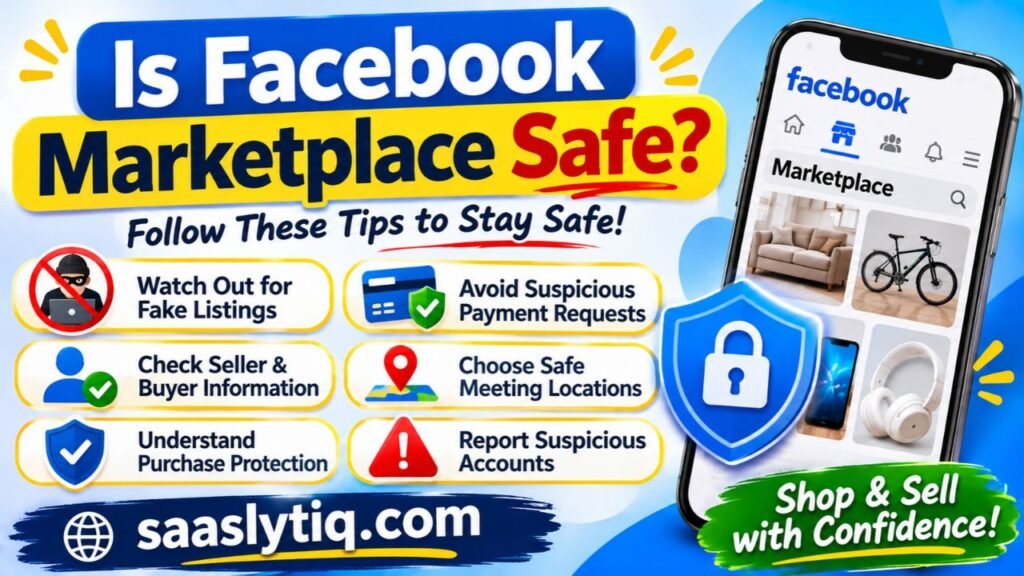
Here are some common risks and ways to protect yourself:
1. Watch Out for Fake Product Listings
Some scammers post attractive product photos with unusually low prices to attract buyers. They may use stolen images or provide misleading product descriptions. Always check the listing carefully and ask for additional photos if necessary. Be cautious when a seller refuses to provide clear product information.
2. Avoid Suspicious Payment Requests
Be careful if someone asks you to pay through an unfamiliar website, send gift cards, or share financial information. Never share your Facebook password, banking PIN, or verification codes with another person. Use payment methods you understand and verify that payments have actually reached your account.
3. Check Seller and Buyer Information
Review available profile details, account activity, and Marketplace ratings before making a deal. Be careful with accounts that show suspicious behavior, copied product images, or inconsistent information. Remember that an established Facebook profile does not automatically guarantee that someone is trustworthy.
4. Choose Safe Meeting Locations
If you arrange a local pickup, choose a well-lit public location with other people around. Avoid meeting strangers in isolated places. For expensive products, consider bringing someone you trust and inspect the item before completing the payment.
5. Understand Facebook’s Purchase Protection
Meta may provide Purchase Protection for eligible purchases made through supported Marketplace checkout options. However, this protection does not cover every transaction, especially deals completed through direct cash payments or arrangements outside eligible checkout systems. Always review the applicable terms before purchasing.
6. Report Suspicious Accounts and Listings
If you notice a fake listing, suspicious seller, or possible scam, use Facebook’s reporting options to report the account or product. Avoid continuing conversations with people who pressure you into making quick payments or sharing personal information.
Important Safety Tip: Never rush into a transaction just because a seller claims that other buyers are interested. Take time to check the product, review the details, and agree on safe payment and delivery arrangements.
By following these precautions, you can reduce common risks and use Facebook Marketplace more confidently. Both buyers and sellers should communicate clearly, verify important information, and avoid deals that seem suspicious.
Is Facebook Marketplace Free to Use?
Facebook Marketplace is generally free to browse and create standard product listings. Users can explore available products, contact sellers through Facebook Messenger, and arrange local buying and selling without paying a basic listing fee. This makes the platform useful for individuals who want to sell unwanted items or find affordable products in their area.
However, some transactions may involve additional costs depending on the services and features available in a particular location.
Here are a few important things to understand:
- Browsing products: You can browse available Marketplace listings without paying a browsing fee.
- Creating listings: Standard listings are generally free for individuals, subject to Facebook’s rules and limits.
- Local pickup: Buyers and sellers can arrange their own collection and payment methods. Any agreed delivery costs depend on their arrangement.
- Shipping costs: Shipped purchases may include delivery charges, depending on the seller and available checkout options.
- Selling fees: Certain selling or checkout services may involve transaction fees, depending on the product category and location.
- Advertising: Businesses and sellers can pay to promote eligible listings through Facebook advertising tools.
Before completing a purchase or selling transaction, review the applicable fees and payment conditions. Not every Marketplace feature is available in every country, so costs and options may differ.
Overall, Facebook Marketplace offers a convenient way to discover products and connect with local buyers and sellers without requiring a basic subscription fee.
Why Can’t I Access Facebook Marketplace?
Sometimes, Facebook users may not see Marketplace in their accounts or may have trouble opening it. This can happen for several reasons, including account restrictions, eligibility requirements, location limitations, or technical problems. Understanding the possible causes can help you identify the issue and find a suitable solution.
Here are some common reasons why Facebook Marketplace may not be available:
1. Your Account Does Not Meet Eligibility Requirements
Facebook Marketplace has eligibility requirements. Users who do not meet the minimum age requirement or other account conditions may not have access to the feature. Make sure your account information is accurate and meets Meta’s requirements.
2. Your Facebook Account Has Restrictions
Facebook may limit Marketplace access if an account violates its Community Standards or Commerce Policies. Repeated violations, suspicious activity, or prohibited product listings can result in restrictions. Check your Facebook notifications and account status to see whether Meta has reported any issues.
3. Marketplace Is Not Available in Your Location
Marketplace features and services may differ by country or region. If you travel or use Facebook from a location where certain features are unavailable, you may experience access problems.
4. Your Facebook App Needs an Update
An outdated Facebook app can sometimes cause features to stop working correctly. Visit the Google Play Store or Apple App Store and install any available updates. You can also try accessing Facebook Marketplace through a web browser.
5. Temporary Technical Problems
Internet connection issues, app errors, or temporary Facebook service problems may prevent Marketplace from loading. Check your internet connection, restart the app, or clear its cache on Android devices.
How to Fix Facebook Marketplace Access Problems
If you believe your account meets the requirements, try these steps:
- Update the Facebook app to its latest version.
- Log out and sign in again.
- Check your account status and notifications.
- Visit Facebook’s Help Center for Marketplace access guidance.
- If your account has an incorrect restriction, follow the available review or appeal process.
Important: Creating another Facebook account or repeatedly submitting listings will not necessarily restore Marketplace access. First, identify the reason for the restriction and follow Meta’s official instructions.
By checking these possible issues, you can better understand why Facebook Marketplace is unavailable and take the appropriate steps to resolve the problem.
Frequently Asked Questions About Facebook Marketplace
Facebook Marketplace offers several features for people who want to buy or sell products online. However, new users often have questions about its costs, account requirements, payment methods, and safety. Here are answers to some common questions.
1. Is Facebook Marketplace Free to Use?
Yes, browsing products and creating standard listings are generally free. However, certain selling services, shipping options, or promotional features may involve additional charges depending on your location and transaction type.
2. Can I Use Facebook Marketplace Without a Facebook Account?
No. You generally need a Facebook account to access Marketplace, browse listings, and communicate with buyers or sellers. You may also need to meet Meta’s account eligibility requirements.
3. Can I Sell Products Without Offering Shipping?
Yes. You can arrange local sales and allow buyers to collect products in person. Shipping is not required for every Marketplace transaction. Available selling and delivery options depend on your location and listing category.
4. How Do I Contact a Seller on Facebook Marketplace?
Open the product listing and select the messaging option to contact the seller through Facebook Messenger. You can ask about product availability, condition, price, and collection arrangements before making a purchase.
5. Does Facebook Marketplace Protect Buyers?
Meta offers Purchase Protection for certain eligible purchases made through supported checkout options. However, not every Marketplace transaction qualifies. Buyers should review the applicable protection terms before paying.
6. Can Businesses Sell on Facebook Marketplace?
Yes. Eligible businesses can use Facebook Marketplace to showcase products and reach potential customers. Available business features depend on account eligibility, location, product category, and Meta’s Commerce Policies.
7. What Products Can I Sell on Facebook Marketplace?
Users can list many permitted products, including furniture, electronics, clothing, vehicles, and household items. However, Meta restricts certain products and services. Sellers should review the Commerce Policies before publishing a listing.
Conclusion
Facebook Marketplace has made online buying and selling easier by connecting people through a familiar social media platform. It allows users to discover local products, compare prices, contact sellers, and create listings without needing a separate online store. Whether you want to purchase affordable secondhand items or sell products you no longer need, the platform offers a convenient way to connect with potential buyers and sellers.
However, a good Marketplace experience requires careful decisions. Always check product details, communicate clearly, verify payments, and follow safe transaction practices. Before using shipping or checkout services, review the available options and protection policies in your location. By understanding how Facebook Marketplace works, you can use its features more confidently and make better buying and selling decisions.